How to warm up a new email for creator outreach
Most indie developers write a good pitch, then send it to 100 creators on day one from a fresh email address. Gmail and Outlook see a new mailbox suddenly sending lots of similar emails, and the pitches quietly land in spam. Nobody replies, and it looks like creators are not interested when they never saw the email.
This is the ramp we used for our own game's outreach campaign. It got our emails into creators' inboxes and creators replied. Nothing about it is complicated, it just takes patience.
Why a new email needs warming up
Email providers judge a sender by its history. A mailbox that has always sent a few emails a day and gets replies looks like a real person. A brand new mailbox that jumps straight to dozens of near-identical emails looks like a spammer, even when every email is personal.
Warming up means starting small and increasing slowly, so your mailbox builds a good reputation before you rely on it.
The ramp we used
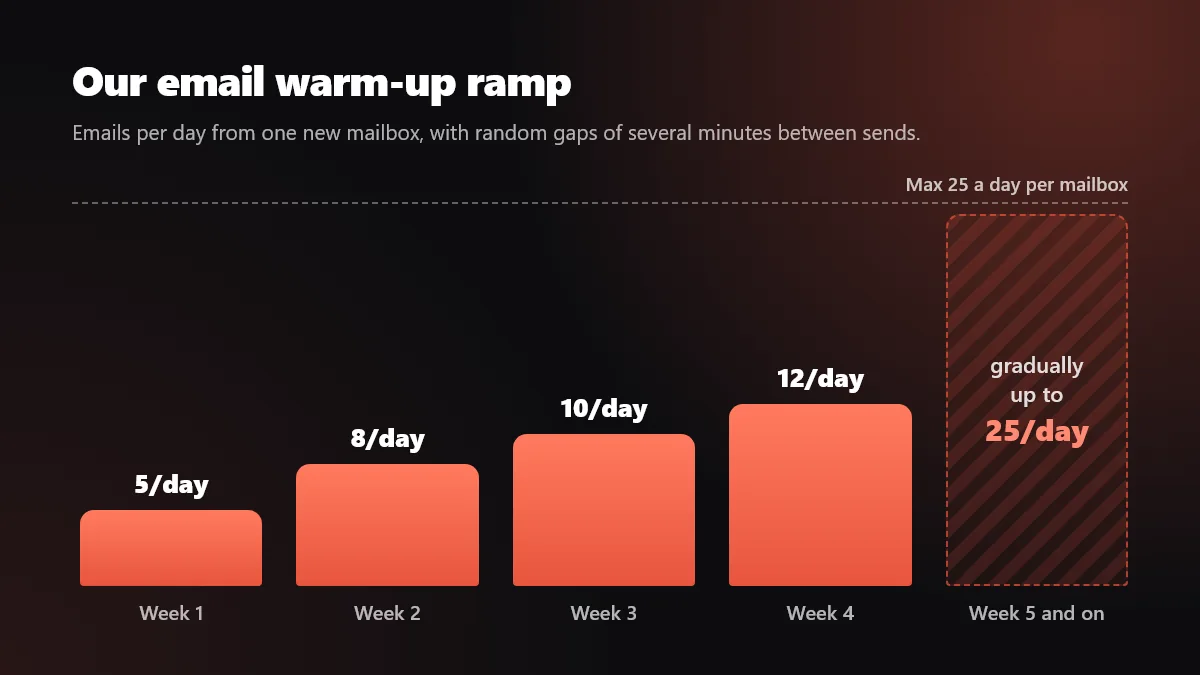
- Week 1: 5 emails a day.
- Week 2: 8 emails a day.
- Week 3: 10 emails a day.
- Week 4: 12 emails a day.
- After that: we kept raising it a little at a time, and capped it at 25 emails a day. We never went higher from one mailbox.
- If bounces climb or replies drop to zero, hold at the current level for a few more days before increasing again.
Natural gaps between emails
We never sent the day's emails in one burst. Each email went out with a random gap of several minutes after the last one, the way a person writing emails by hand would send them.
Bursts of identical-looking emails seconds apart are one of the clearest spam signals. Random gaps make your sending look human, because it is.
Set up your email before you send anything
- Use an address on your own domain (like you@yourstudio.com), not a free address, if you can.
- Make sure SPF, DKIM and DMARC are set up for your domain. Your email provider has a guide for each.
- Use a real mailbox that also receives and answers normal email, not a send-only address.
- Add a signature with your name, studio and website.
Keep your reputation healthy while you ramp up
- Personalize every pitch. Similar wording is fine, identical emails to everyone are not.
- Check emails before you send. Bounces from dead addresses hurt your reputation fast.
- Keep links to a few: Steam page, trailer, press kit. Do not attach files.
- Give an easy way out, like the "reply No thanks" line in our pitch template. It is polite and it keeps spam complaints away.
- Reply to creators quickly. Real conversations are the strongest signal that you are not a spammer.
- Stop following up as soon as someone replies, and never send more than two follow-ups.
How to set this up in Launch Air
- In each campaign, set emails per day (start at 5) and a random gap between emails, for example 3 to 10 minutes. Launch Air picks a random gap in that range before every send.
- Set a sending schedule and timezone so emails only go out during normal hours.
- For a hands-off ramp, turn on Auto warmup ramp-up when you connect your email account, and set a starting limit, a daily increase and a maximum per day. Auto warmup is included on Solo and Studio.
- Or do what we did: keep warmup simple and raise the campaign's emails per day yourself each week, up to your maximum.
- Use our first-pitch template with {{first_name}} and {{steam_key}}, so every creator gets a personal email with their own key.
Try Launch Air free
Find creators for your game, email them from your own inbox and track every Steam key. Free to start, no credit card.
Get Started Free